

How to Pay Your Invoice
Please have your invoice number and invoice total ready before selecting a payment method.
Review Your Invoice
1
Confirm the invoice amount and payment due date listed on your invoice.
☆ Invoices will be sent to the email address you provided.
☆ If you did not receive your invoice, please contact downtempbowl@gmail.com before submitting payment.
Choose a Payment Method
2
Please Note: Processing charges may apply depending on your selected payment method.
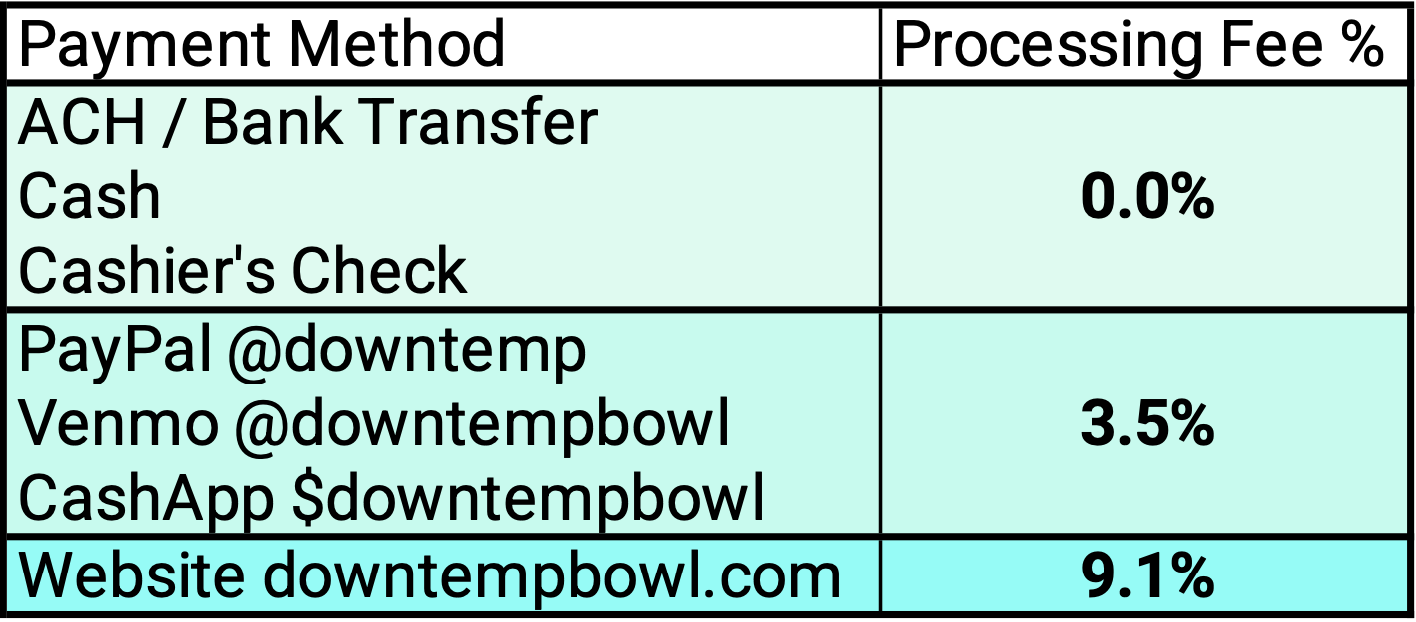
No Processing Fee (0%)
☆ Cash — Pay the exact invoice total.
☆ Cashier’s Check — Make payment for the exact invoice total and include your invoice number with your payment. Must be Cashier’s Check or Money Order.
☆ ACH / Bank Transfer — You must Request ACH Instructions to receive secure payment details. Pay the exact invoice total.
☆ Zelle — Coming Soon
Zelle is currently unavailable but will soon be offered as an additional 0% processing fee payment option.
3.5% Processing Fee
☆ PayPal ☆ Venmo ☆ CashApp
Before sending payment, use the Invoice Total Calculator to add the 3.5% processing fee to your invoice amount. Submit the Total Due shown by the calculator.
9.1% Processing Fee Website Payment
☆ Website: www.Downtempbowl.com• Credit Cards Accepted
You must Request (Online) Website Payment Instructions to receive secure payment details. You will receive a payment link by email or text that is tailored specifically to your invoice. The 9.1% processing fee will already be included in the total amount due.
Invoice Total Calculator
Processing Fee: $0.00
💰 Total Due: $0.00
Include Your Invoice Number
3
When available, include your invoice number in the payment note or memo so your payment can be matched to your invoice.
Payment Confirmation
4
Your invoice will be marked as paid once payment has been received and confirmed. ACH and other bank payments may take additional time to process.
Important: Processing fees apply only to the selected payment method. Cash, Cashier’s Check, and ACH payments have no processing fee.